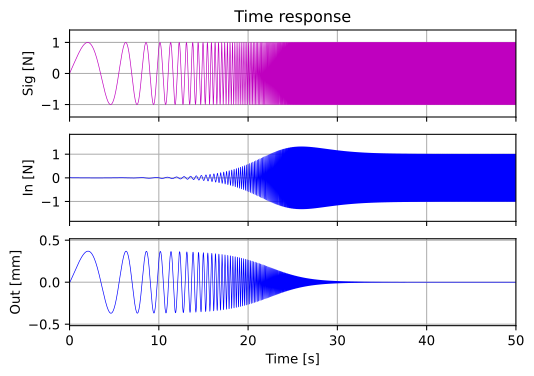
Here, \(A\) is the amplitude of the Chirp signal, \(f_{\mathrm{min}}\) is the starting frequency at \(t=0\), and the frequency at any given time \(t\) is \(f_{\mathrm{min}}k^t\).
Note that the differentiator in the PD controller includes a time constant \(\tau_D\). This is because a pure differentiator \(s\) is mathematically impossible to implement in practice, so it is realized in this filtered form. Since this chapter focuses on system identification, the details of this implementation will be covered in the Controller Design chapter.
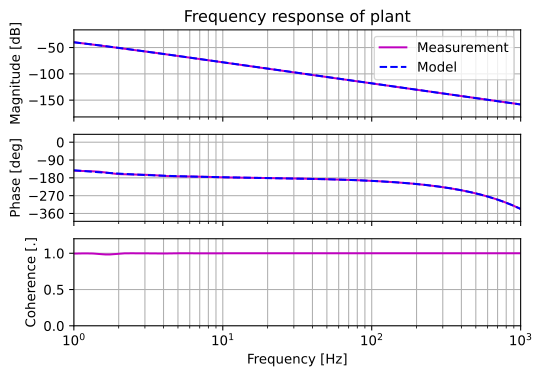
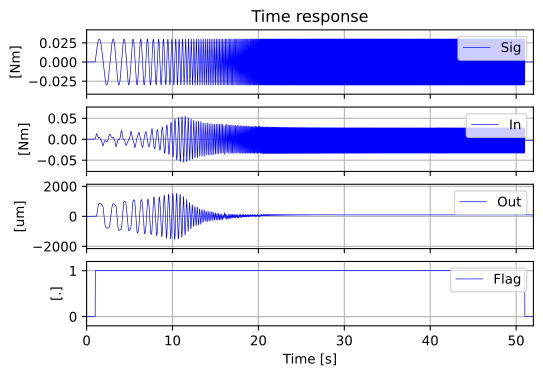
The Python execution module is provided below. This simulation implements the PD controller to stabilize the motor model, then applies a Chirp signal that sweeps exponentially from \(0.1[\mathrm{Hz}]\) to \(2.0[\mathrm{kHz}]\) over \(50[\mathrm{s}]\). The frequency response analyzed from the input-output data is then compared with the theoretical frequency response obtained via \(j\omega\) analysis. The PD controller is designed using a technique called Pole Placement, which will also be detailed in the Controller Design chapter.
Start simulation!
Common parameters were set.
Plant model was set.
PID controller was designed.
System identification simulation is running...
The common pole-zeros of the zpk model have been deleted.
Plotting figures...
Finished.
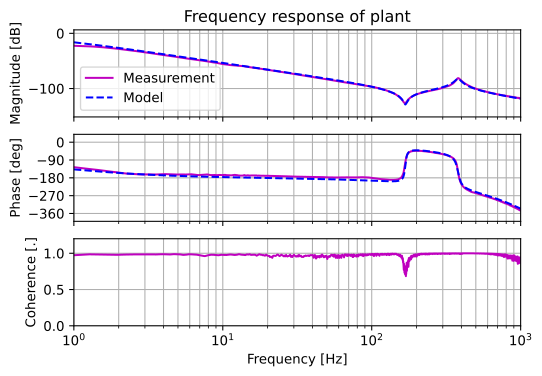
The first output shows the time response of the excitation signal \(\mathrm{Sig}(t)\), input signal \(\mathrm{In}(t)\), and output signal \(\mathrm{Out}(t)\). The second output compares the measured frequency response (analyzed from the time-series data) with the model’s frequency response. The results match almost perfectly, confirming that the system identification process based on input-output time responses is valid.
The Coherence shown in the bottom plot is an index indicating the degree of correlation between the input and output signals. It ranges from \(0\) to \(1\), where a value closer to \(1\) indicates a higher correlation. If the coherence is low, the reliability of the frequency response in that specific range is also low. In this case, since the plot is based on noise-free simulation data, the coherence stays consistently near \(1\).
2 Python Functions for Analysis
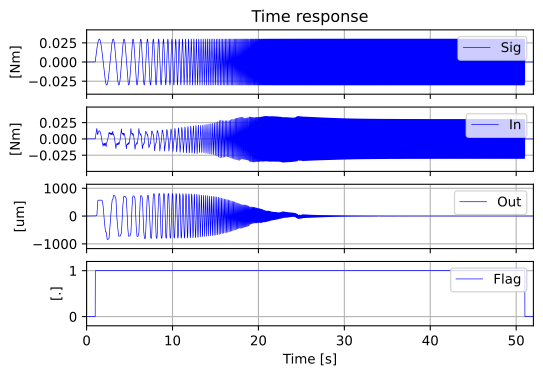
In actual system identification, rather than the simulations shown in previous sections, an excitation signal \(\mathrm{Sig}(t)\) is applied to the control system of the actual plant. To perform the analysis, we record the actual system’s input signal \(\mathrm{In}(t)\), output signal \(\mathrm{Out}(t)\), and a flag signal \(\mathrm{Flag}(t)\) that indicates the excitation period.
The Python package pylib-sakata provides functions to derive frequency response data from CSV files recorded and saved using the TwinCAT3 Measurement YT Scope Project.
Here are some examples of system identification performed using the Python functions introduced in in previous theory section.
3.1 System Identification of a Servomotor
Here is a practical example of system identification for a BECKHOFF servomotor, model AM8111-1F21.
3.1.1 Measurement during Excitation
The following video shows the data acquisition process during Chirp signal excitation using the YT chart function of TwinCAT3 Scope View (TE13xx).
3.1.2 Analysis Software
The following Python module is used to perform system identification using the actual data obtained from the Chirp excitation. The dataset used is freq_resp_PD_20250903.csv, which can be found Here.
Start simulation!
Common parameters were set.
Getting measurement data...
Plotting figures...
Finished.
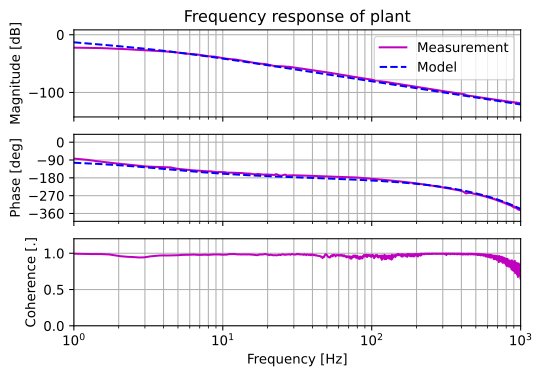
The first output represents the time response of the excitation signal \(\mathrm{Sig}(t)\), the input signal \(\mathrm{In}(t)\), the output signal \(\mathrm{Out}(t)\), and a flag signal (indicating excitation with a value of \(1\)). By using the Python functions introduced in the previous section, the actual frequency response characteristics can be derived from these measured time-series data. The second output shows a comparison between the frequency response of the model and the actual system.
By tuning the model’s mass (or inertia \(J\) for rotational systems) \(M\) and damping coefficient \(C\), the model’s frequency response is adjusted to match the actual plant, as shown in the plot. The closer they align, the more accurately the model and its parameters represent the real-world system’s characteristics. Once a satisfactory model is obtained, you can proceed to the controller design phase based on this validated model.
3.2 System Identification of a Servomotor with a Load
A servomotor is an actuator used to drive mechanical mechanisms. In practical field applications, motors are rarely operated alone; they are almost always connected to some form of mechanical system.
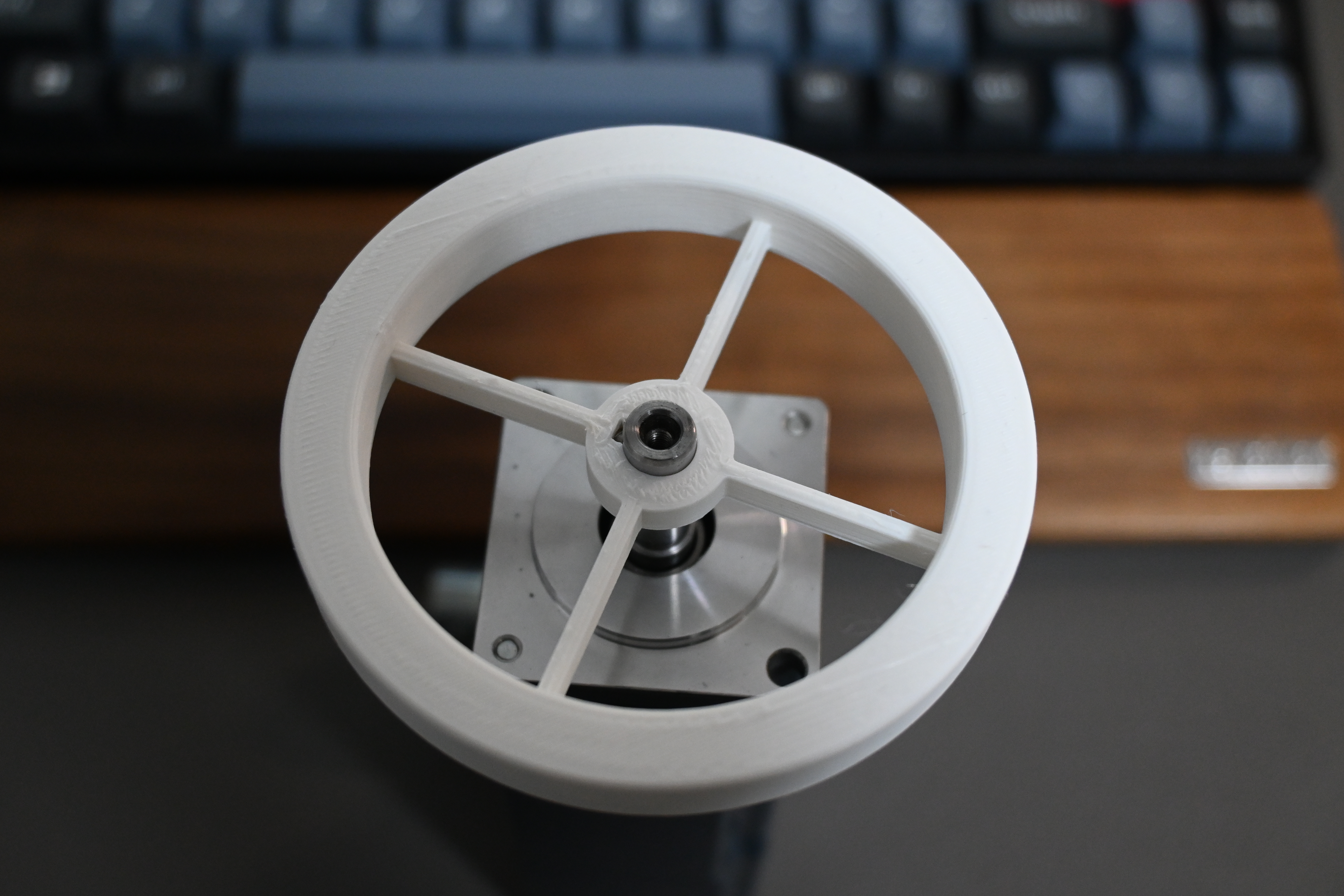
Here, we will perform system identification of a servomotor with a load, using a simple mechanism created with 3D CAD and attached to the motor shaft. You can find the 3D CAD models and G-code HERE.
This load mechanism is structured such that the shaft mounting member and the outer peripheral member are connected by four leaf springs. This design results in low stiffness only in the rotational direction, while other directions are constrained. Consequently, the system with this load mechanism attached behaves as a two-inertia system.
4 Two-Inertia System Model
A two-inertia system can be represented by the mechanical configuration shown below, consisting of a driving-side mass \(M_1\), a load-side mass \(M_2\), a spring \(K_\mathrm{reso}\) and damper \(C_\mathrm{reso}\) connecting them, an applied force \(u(=f)\), and positions \(y_1\) (driving side) and \(y_2\) (load side). This is referred to as a two-mass system in translational terms. For rotational systems, it is called a two-inertia system, and the same model applies by replacing mass with inertia and force with torque.
The model of a two-inertia system can be expressed as the linear sum of a rigid-body model \(P_{\mathrm{rigid}}(s)\) and a resonance model \(P_{\mathrm{reso}}(s)\):
Here, \(P_1(s)\) is the transfer function from force (torque) \(u\) to the driving-side position \(y_1\), and \(P_2(s)\) is the transfer function from \(u\) to the load-side position \(y_2\). The rigid-body and resonance models are defined as follows:
As with the standalone motor, here is a video showing the data acquisition process during Chirp signal excitation with the load mechanism attached, using the YT chart function of TwinCAT3 Scope View (TE13xx).
4.0.2 Analysis Software
As with the standalone motor, the following Python module is used to perform system identification using actual data obtained from Chirp excitation. The dataset used is freq_resp_2mass_20250902.csv, which can be found HERE.
Start simulation!
Common parameters were set.
Plant model was set.
Getting measurement data...
Plotting figures...
Finished.
4.0.3 Tips for System Identification in a Two-Inertia System
In the system identification of a standalone motor, the process is straightforward as it only involves fitting two parameters: mass (inertia) \(M\) and damping \(C\). In contrast, a two-inertia system has five parameters to fit, which can be overwhelming. However, there is a specific strategy for efficient identification.
First, by aligning the mass line of the rigid-body model \(P_{\mathrm{rigid}}(s)\), the total mass \(M_1 + M_2\) is determined. Next, identify the resonant frequency \(f_{\mathrm{reso}}[\mathrm{Hz}]\) and the anti-resonant frequency \(f_{\mathrm{anti}}[\mathrm{Hz}]\) from the plot.
By using the previously fitted total mass \(M_1 + M_2\) and the values of \(f_{\mathrm{reso}}\) and \(f_{\mathrm{anti}}\) read from the graph, the driving-side mass \(M_1\) is determined.
Subsequently, the load-side mass \(M_2\) and the spring constant \(K_\mathrm{reso}\) are derived from the resonance or anti-resonance equations.
Finally, adjust the resonance damping \(C_{\mathrm{reso}}\) to match the height of the gain peak at \(f_{\mathrm{reso}}\). The rigid-body damping \(C\) is adjusted in the same manner as with the standalone motor.
By following this logical sequence, even a complex two-inertia system can be identified accurately.